Set Your Budget in Your Local Currency
Learn how to change the currency within the Budget Plan app to accurately reflect your spending.
When managing your monthly finances, using the correct currency is fundamental to understanding your spending habits. Budget Plan allows you to easily set and change the currency used throughout the app, ensuring your budget accurately reflects your local economic reality. This is especially important if you travel or deal with income and expenses in different currencies.
Why Currency Matters for Your Budget
Your budget is a reflection of your financial life, and the currency you use directly impacts how you perceive and track your money. If you primarily earn and spend in Euros, but your budgeting app is set to US Dollars, you'll constantly be performing mental conversions. This can lead to confusion, miscalculations, and ultimately, a budget that doesn't serve its purpose.
For example, if your monthly rent is €1,200 and your groceries cost €400, these figures are clear and actionable when displayed in Euros. If they were shown as approximately $1,300 and $430 (depending on the exchange rate), it adds an unnecessary layer of complexity. By setting your preferred currency, Budget Plan ensures that all your income, expenses, and savings goals are presented in a way that is immediately understandable and relevant to your daily financial decisions. This clarity is key to maintaining a realistic and effective budget.
How to Change Your Currency Setting
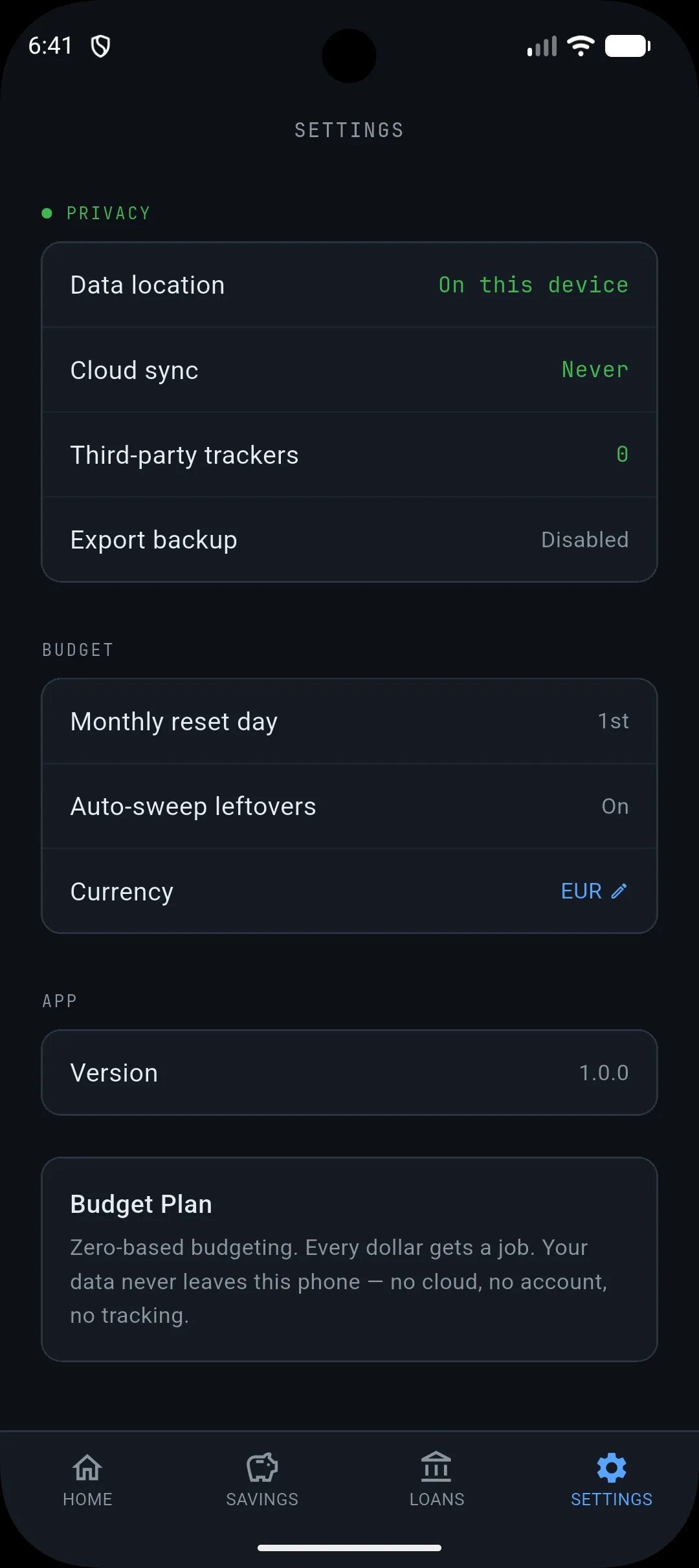
Budget Plan makes it simple to adjust your currency settings directly within the app. Navigate to the main settings screen, where you can find options to customize your budgeting experience. Under the "BUDGET" section, you will see a clear option labelled "Currency."
Tapping on the current currency displayed (e.g., "EUR") will open an interface allowing you to select from a range of available currencies. Choose the one that best suits your primary financial needs. Once selected, all monetary values within your budget – from your income and planned expenses like rent and groceries, to your savings contributions and daily spending – will automatically update to reflect your chosen currency. This ensures consistency and accuracy across all your financial tracking within the app.
Taking Control of Your Financial View
Understanding and controlling how your finances are presented is a powerful step towards a calmer relationship with money. By ensuring your budget operates in your local currency, you remove potential barriers to clarity and make informed decisions more straightforward. This small adjustment can have a significant impact on your ability to stick to your budget and achieve your financial goals.
Your action today: Open the Budget Plan app, navigate to the settings, and verify that your currency is set correctly. If not, take a moment to change it to your primary currency.