Plan Your Expenses with Confidence
Learn how to use Budget Plan's expense planning feature to allocate your income and gain control over your monthly finances.
Taking control of your monthly finances starts with a clear plan for your money. Budget Plan helps you do just that by allowing you to assign every euro or pound a job before the month even begins. This screen is where that planning comes to life, transforming your income into actionable spending categories.
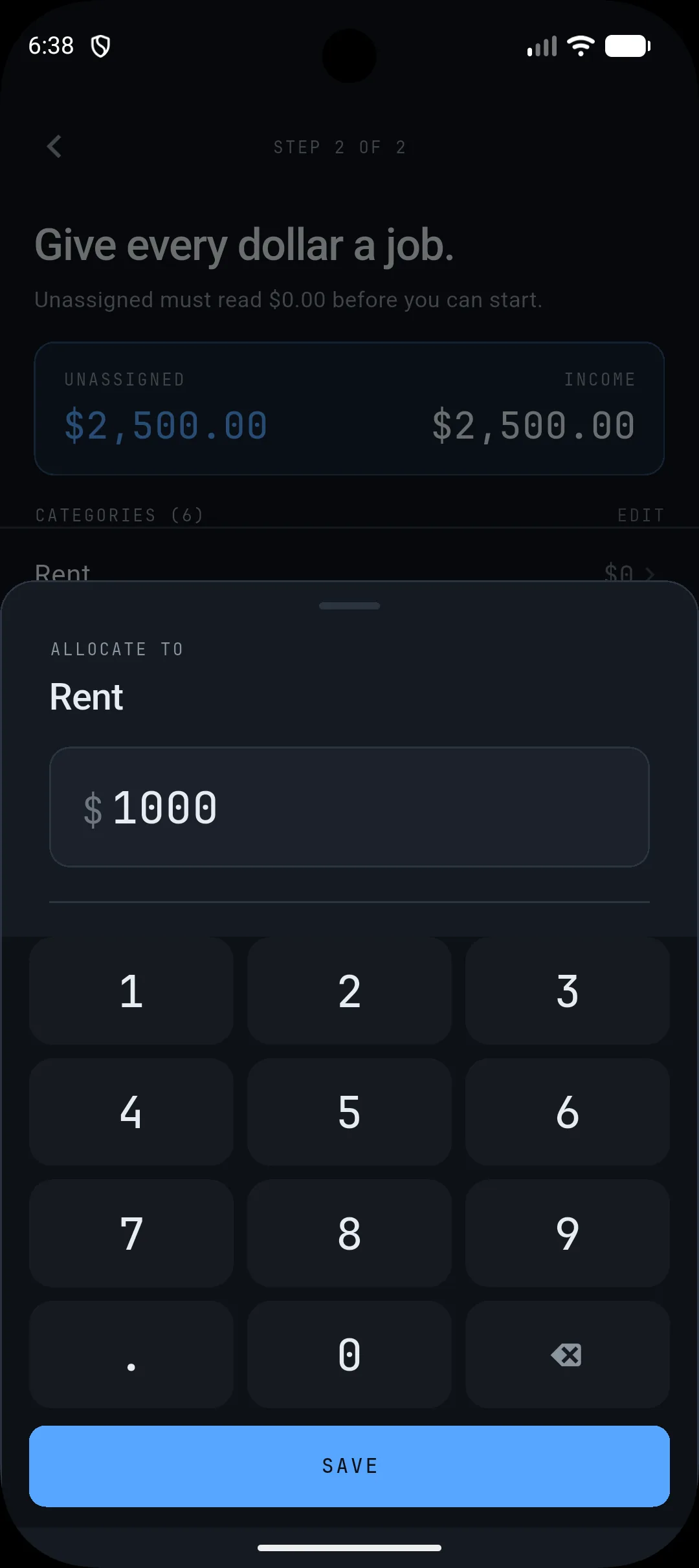
Giving Every Dollar a Job
The screen you see is the heart of your monthly budgeting process. It displays your total unassigned income at the top, with the goal being to reduce this amount to £0.00. Below this, you'll find a list of your expense categories, such as "Rent," "Groceries," or "Transit," each with an amount you've allocated. The interface prompts you to assign a specific monetary value to each category. For instance, if your rent is £1000, you would enter that amount. This ensures that you know exactly how much you intend to spend on essential items and discretionary wants, preventing overspending and promoting mindful consumption.
Why This Matters for Monthly Budgeting
This "expense planning" view is crucial because it directly addresses the core of proactive budgeting. Instead of reacting to where your money went, you're deciding where it will go. By assigning your income to specific categories, you create a roadmap for your spending. This prevents the common pitfall of having unallocated funds that can easily be spent impulsively. It also helps you identify potential shortfalls or areas where you might be over-budgeting before the month's expenses even occur. Seeing your income allocated across categories like rent, groceries, utilities, and savings provides a clear picture of your financial priorities and how your income supports them.
Your Next Step: Allocate Your Income
The power of this screen lies in its simplicity and directness. Your immediate task is to go through each of your defined expense categories and allocate the appropriate amount of money to them. If you have £2,500 in income, your goal is to assign all £2,500 to your various spending categories. This might involve setting aside a specific amount for rent, another for groceries, a portion for transportation, and perhaps some for savings or entertainment.
Once you have assigned all your income, you'll see the "Unassigned" amount reduce to £0.00. This signifies that you have a complete plan for your money for the month. If you make a mistake or need to adjust an amount, you can easily tap on a category to edit the allocated sum, using the on-screen calculator to input the correct figure.
Take a moment today to open Budget Plan and actively assign your income to your expense categories. See how it feels to have a clear, intentional plan for your money before the month begins.